

v7.13 Release: Formulas & Regex
September 03, 2026 / in Releases, Data Controller / by Allan Bowev7.13: Formulas & Regex
We stopped writing release-specific blog posts after v6.1 - the automated, public release system made them redundant for routine version bumps. But every so often a release lands that changes what the product can actually do, and v7.13 is one of them. Together with 7.12 it completes a piece of the roadmap we have been chipping away at for a while: frontend formulae and regex rules, both configurable purely in MPE_VALIDATIONS.
If you configure data entry in Data Controller, this post is a practical guide: how the rules work, how to set them up, and the process flow from config to grid. All the screenshots below are captured from a live editor session against the demo tables, so what you see is what shipped.
Why this matters
Data Controller's job is to let business users change data safely. A big part of "safely" is catching problems at the point of entry - rather than after an approval, in a batch log, or (worst case) in a report. The validations framework already covered length, type, nullability, primary keys, ranges, casing and dropdowns. Two things were missing:
- Computed values. Plenty of tables have columns that are derived from other columns - a revenue column that is price times volume, a stamp column that records who last touched a row. Until now the options were a backend hook script (real SAS code to write, test and deploy) or just letting users type anything.
- Pattern enforcement. A dropdown is overkill when all you need is "this value looks like an email address" or "this postcode is well-formed". You want the shape of the value checked as typed - and sometimes you want a hard block, sometimes just a gentle warning.
7.12 delivered regex rules (HARDREGEX / SOFTREGEX). 7.13 delivers formulas (HARDFORMULA / SOFTFORMULA). Both are rows in a config table. That is the whole feature.
The process flow: from MPE_VALIDATIONS to the grid
Every configurable rule in Data Controller follows the same pipeline, and the new rules plug straight into it:
- Configure.
MPE_VALIDATIONSis itself a Data Controller table - open it from the navigation tree like any other, and add a row withBASE_LIB,BASE_DSandBASE_COLpointing at the column you want to govern,RULE_TYPEset to the new rule,RULE_VALUEholding the formula or pattern, andRULE_ACTIVE=1. Submit, approve, done - it's a config change, not a code release. The MPE_VALIDATIONS table guide has the full column reference. - Serve. When a user opens the editor, the
editors/getdataservice extracts the active rules for that table - it filtersMPE_VALIDATIONSon library, table andRULE_ACTIVE=1- and returns them in thedqrulesobject of the response, alongside the table data, schema, and the schema-derivedNOTNULLconstraints. - Apply. The frontend wires each rule into the Handsontable grid: formula rules are computed live by HyperFormula (the calculation engine behind Handsontable itself), regex rules are evaluated in the browser with the JavaScript regex engine.
- Block or warn. On submit, the standard cell validation cycle runs:
HARDrules block the submission if violated,SOFTrules warn but allow.
Here are the new rule types as they appear in the config - one row per rule, RULE_VALUE holding the formula or the pattern:
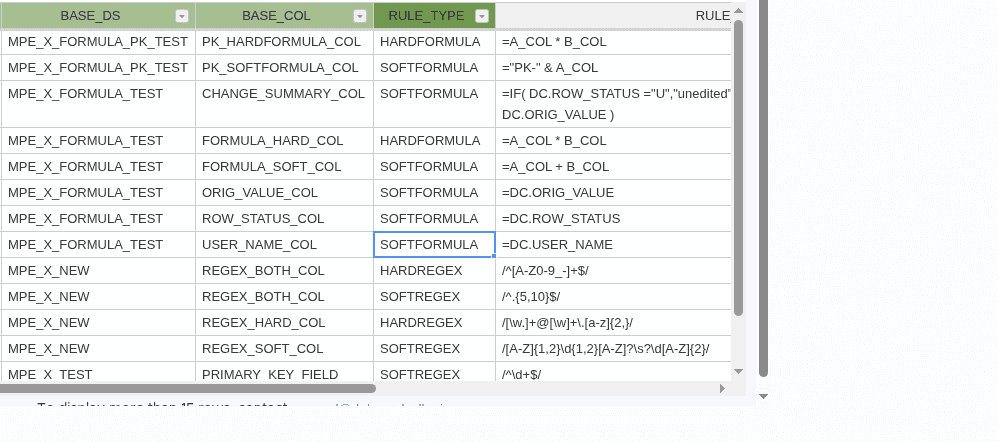
For regex there is also a config-time guard, and it's a neat piece of dogfooding: because the rule itself lives in a table, saving an edit to MPE_VALIDATIONS through Data Controller runs the post-edit hook, which passes every HARDREGEX / SOFTREGEX RULE_VALUE through PRXPARSE and rejects the edit if the pattern is invalid - listing the offending columns. A typo in a pattern is caught the moment you save the rule, not the first time a user hits it.
Regex rules (HARDREGEX / SOFTREGEX, v7.12)
Regex rules validate cell values against a SAS (Perl-style) regular expression. You provide the pattern in RULE_VALUE; whether it blocks or warns depends on the rule type:
- HARDREGEX - the value must match the pattern. If it doesn't, the cell is highlighted red and submission is blocked.
- SOFTREGEX - a non-matching value is highlighted yellow as a warning. The user can still submit - it's a nudge, not a block.
Setting one up
Say SOME_CHAR in the demo table must contain either "the" or "data" (case-insensitive). That's one insert:
insert into &lib..MPE_VALIDATIONS set
    tx_from=0
    ,base_lib="&lib"
    ,base_ds="MPE_X_TEST"
    ,base_col="SOME_CHAR"
    ,rule_type='HARDREGEX'
    ,rule_value='/the|data/i'
    ,rule_active=1
    ,tx_to='31DEC5999:23:59:59'dt;
That's a real row from the demo data, by the way - the shipped MPE_X_TEST table carries sample HARDREGEX and SOFTREGEX rules so you can try both without touching your own config.
In the editor it looks like this - an invalid email blocked red by HARDREGEX, an invalid postcode warned yellow by SOFTREGEX, and a value that passes:
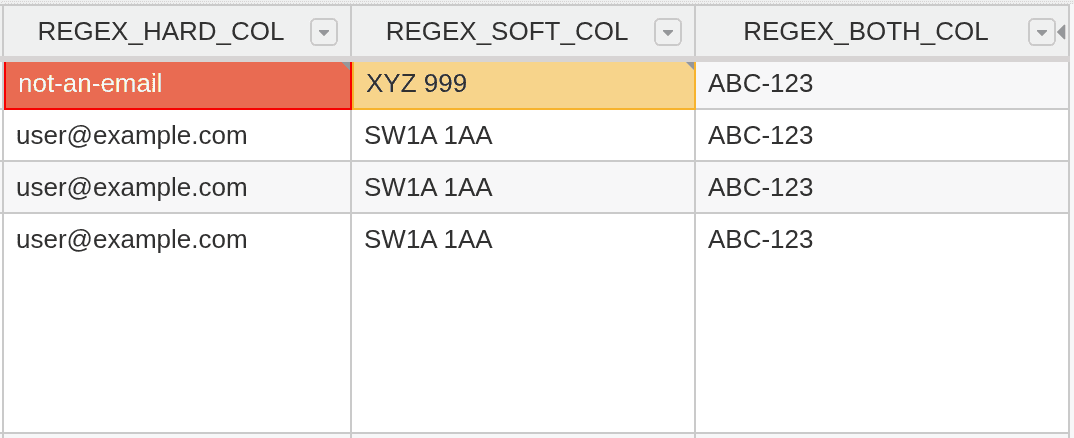
Note the third column in that screenshot, REGEX_BOTH_COL. It carries both a HARDREGEX and a SOFTREGEX rule - and shows neither warning. That's the precedence rule in action: only one regex is ever applied per column, and if both exist the SOFTREGEX is ignored entirely, so the column behaves exactly as if it were HARDREGEX-only.
What to know before writing patterns
The full list of gotchas is in the regex rules documentation; the ones that matter most in practice:
- Use the PRX delimiter form. Patterns are authored exactly as PRXPARSE accepts them:
/pattern/flags, e.g./^\d+$/for "integers only",/the|data/ifor a case-insensitive contains. The config-timePRXPARSEcheck enforces this - a bare pattern without delimiters will be rejected when you save the rule. (The frontend tolerates bare patterns for backwards compatibility, but don't author new rules that way.) - Anchor your own patterns. The pattern is used as authored - it is not auto-anchored.
/the|data/imatches "the" anywhere in the value. If you want the whole value to match, include^and$yourself. - Stick to the common subset. The pattern is evaluated in the browser with the JavaScript regex engine, which shares SAS PRX's core syntax (character classes, quantifiers, groups, alternation,
^/$anchors,\d \w \sand friends). Three unambiguous Perl-isms are translated automatically - a leading(?i)modifier,\Q...\Eliteral sequences, and\A/\zabsolute anchors. But Perl-only constructs such as possessive quantifiers (a++) and atomic groups ((?>...)) pass the SAS-side check and then silently do nothing in the frontend - so just don't use them. - Blank is exempt. Blank values skip pattern matching on any column type (use the
NOTNULLrule if you also need populated values). On numeric columns the plain SAS missing (.) is also exempt - but special missings (.A-.Z,._) are not: they're deliberately-set values, so your pattern needs to accommodate them. - One regex per column. As above -
HARDREGEXwins when both are present, and the column-header info dropdown shows only the rule that is actually applied. - Length limit.
RULE_VALUEis 128 characters, which constrains very long patterns. - Deleted rows are exempt. Cells in rows marked for deletion are not validated or warned (except primary key columns, which still are).
Where regex beats a dropdown
For currency codes, country codes, account number formats, email shapes, or "must be an integer" - a regex is one row of config versus a 1000-value HARDSELECT dropdown. And unlike a dropdown, a regex catches paste operations too, not just typed values.
Formula rules (HARDFORMULA / SOFTFORMULA, v7.13)
Formula rules make a column compute itself from other columns in the same row - like a spreadsheet formula, but the formula lives in config and applies to every row. When a user opens the editor, the formula is evaluated live and the result is shown in each cell. Change an input, and every dependent cell recalculates on the spot.
Writing a formula
Formulas use column names, not cell references - there is no need to know the grid layout. If you have A_COL and B_COL, a FORMULA_HARD_COL rule is simply:
=A_COL * B_COL
Each row calculates its own result: row 1's values, row 2's values, and so on. Under the hood each column name is translated to a row-relative cell reference (text inside quotes is left untouched) and handed to HyperFormula - so you get the full spreadsheet function library, IF, SUM, ROUND, CONCAT and friends, without writing any code.
The one syntax rule: each column name must be surrounded by spaces. =MATCH( PRICE ) resolves the column reference; =MATCH(PRICE) does not - without the surrounding blanks the token isn't recognised as a column reference, and the formula errors rather than using the column's value. The spaces stop column names clashing with function names.
HARD vs SOFT formulas
- HARDFORMULA - the column is read-only. The formula result is always shown and submitted; the user cannot change it. Think calculated amounts, or a
PROCESSED_BYcolumn. - SOFTFORMULA - the cell shows the formula result, but the user can type a different value if the computed one is wrong. Their value is submitted instead. Useful for derived defaults where the business occasionally needs to override.
Special values
Formulas can reference three runtime values, resolved when the formula is evaluated:
DC.ROW_STATUS- the row's current state:M(Modified),A(Added),D(Deleted), orU(Unchanged). A newly-added row isAfrom the moment it is created - there is no transient state before that.DC.USER_NAME- the logged-in user id.DC.ORIG_VALUE- the original cell value before the current edit.
Our demo formula table puts them all to work. There's a row-status column (=DC.ROW_STATUS), a user column (=DC.USER_NAME), and a CHANGE_SUMMARY_COL whose rule reads like a proper audit sentence:
=IF( DC.ROW_STATUS ="U","unedited",
  DC.USER_NAME &" changed from "& DC.ORIG_VALUE )
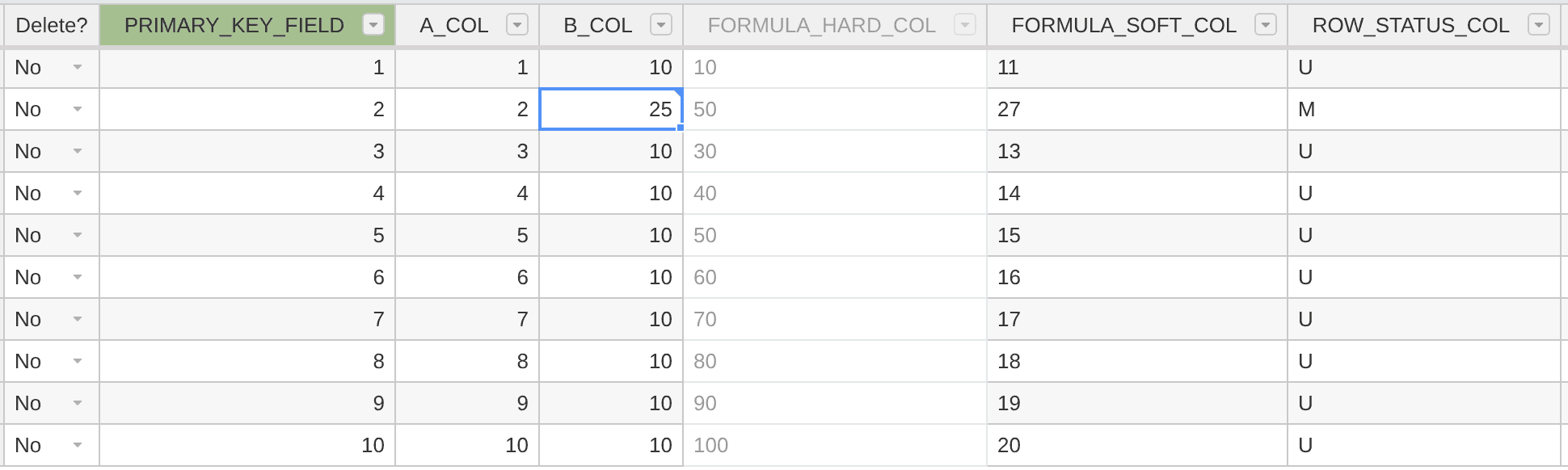
Here it is live in the editor. We edited B_COL on the second row from 10 to 25 - and the whole row reacted: FORMULA_HARD_COL recomputed to 50 (A_COL * B_COL), FORMULA_SOFT_COL recomputed to 27 (A_COL + B_COL), and the row status flipped from U to M - all instantly, all without touching a single line of SAS:
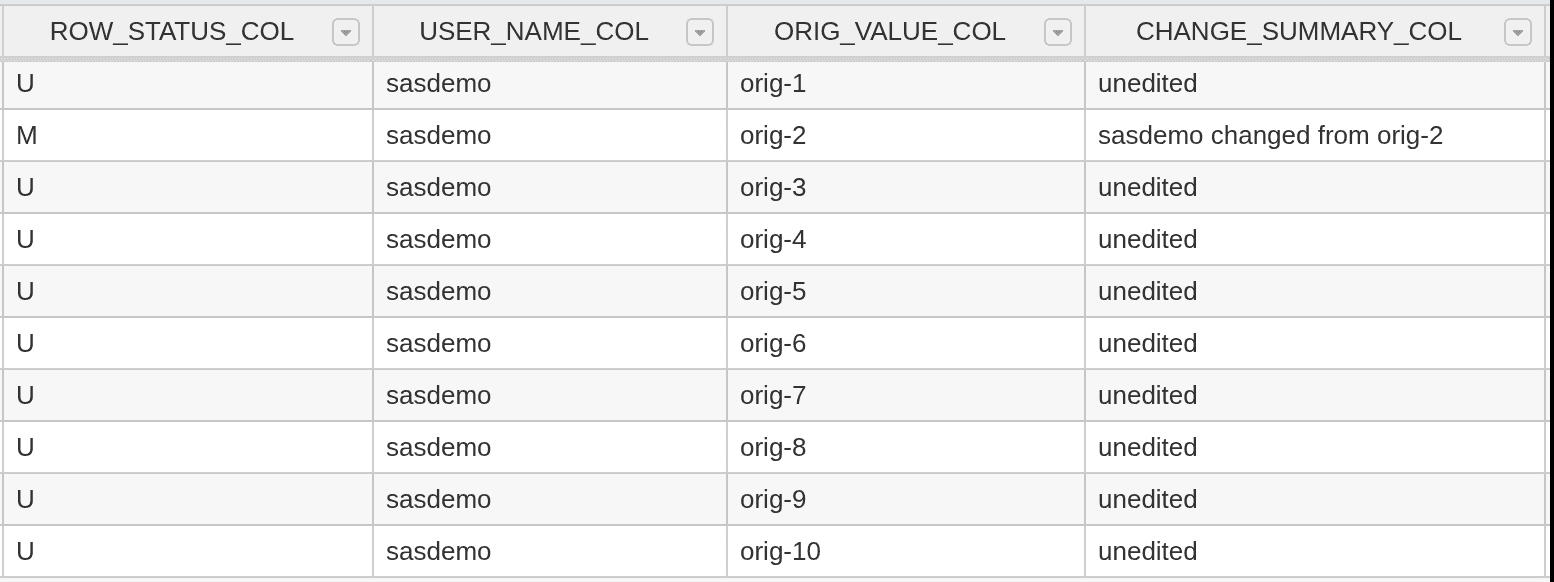
And here's the payoff of those DC.* references - the audit columns from the same table, same edit. ROW_STATUS_COL flipped to M, and the change summary resolved the IF formula above into a sentence - "sasdemo changed from orig-2":
Because DC.ROW_STATUS is a live reference, it updates as the user works: edit a cell and the stamp flips to your user id; cancel the edit and it reverts.
Editor behaviour worth knowing
- When you paste a formula into the grid, column names are automatically translated so the formula works in its new position.
- A cell that is overwritten by a formula is flagged (with the original value retained) so you can revert it.
- Formula-looking values pasted from Excel are treated as plain data (not evaluated), unless you explicitly choose "Apply as formula" - a deliberate safety measure so a spreadsheet's internal formulas don't leak into your data as live rules.
- When submitted, it's the formula's computed value that is sent to the backend, never the raw formula text (a primary key column always resolves its live formula immediately to the computed value so the submission keys are correct).
How it works under the hood (briefly)
Two moving parts, and the boundary between them explains most of the gotchas above.
Serving the rules. getdata extracts the active MPE_VALIDATIONS rows for the target table and returns them in dqrules, along with the schema-derived NOTNULL constraints. Formulas and regex are frontend rules - they are evaluated in the browser, not in SAS - which is why they arrive as dqrules rather than as backend hook scripts.
Evaluating them. For formulas, the client translates each column name in RULE_VALUE to a row-relative cell reference and hands it to HyperFormula (wired into Handsontable's formulas plugin). For regex, the client parses the PRX /pattern/flags form, translates the three Perl-isms it can, and constructs a JavaScript RegExp. If a pattern still fails in the browser, the editor treats it as always-valid rather than breaking - a failed pattern never blocks a submission it shouldn't.
Guarding the config. Because MPE_VALIDATIONS is itself a Data Controller table, a post-edit hook validates new rules: PRXPARSE checks every regex RULE_VALUE, and the edit is rejected with the offending columns listed. Invalid rules never reach users.
Also in these releases
Beyond the headline features, the usual spread of hardening and polishing shipped along the way: row-header status cells are now colour-coded (with a ± symbol for modified rows), CAS support landed for the REPLACE load type, Viya deploy diagnostics were improved, and a large tranche of dependency upgrades (Angular 20, Handsontable 18 pinned, sasjs core v5) keeps the audit trail clean. As ever, the full commit-by-commit detail is in the release notes.
Upgrading
The frontend changes are included in the 7.13 release assets. The backend additions are data-only, optional migrations:
- The v7.12 migration adds
HARDREGEX/SOFTREGEXto theRULE_TYPEdropdown inMPE_VALIDATIONS(and switches theMPE_SECURITY.LIBREFvalidation to a hook that lists all libraries). - The v7.13 migration adds
HARDFORMULA/SOFTFORMULAto the same dropdown.
Both scripts are in sas/sasjs/db/migrations/ in the source repo, and they're worth running even if you don't plan to use the rules immediately - they only add dropdown values to MPE_SELECTBOX.
Try it yourself
The shipped demo data includes the regex rules on MPE_X_TEST, so you can see them working without configuring anything: open the demo library, edit MPE_X_TEST, and try entering a SOME_SHORTNUM between 1 and 5 (blocked red - HARDREGEX), a PRIMARY_KEY_FIELD with a decimal point (warned yellow - SOFTREGEX), or a SOME_CHAR without "the" or "data" in it (blocked - HARDREGEX).
For formulas, add a rule to one of your own tables - the REVENUE = PRICE * VOLUME example above is a two-minute configuration, and the DC.* special values make audit-style columns almost free. Full reference in the validations docs.
As ever - if you'd like to see additional validation types, get in touch. The roadmap is customer-driven, and the validations list keeps growing.
Data Controller
Data Controller is the product of a UK company with a singular focus on SAS Web Apps.
Source Code
Data Controller source is on our self-hosted Gitea Repository; the underlying SASjs framework is on GitHub.